From paper to eQMS: a migration plan for small life-science companies
A six-phase plan for moving a small pharma, biotech or medical-device quality system from paper to an eQMS: what to migrate or archive, how to handle true copies and validation, and how to plan the cut-over and the first 90 days.
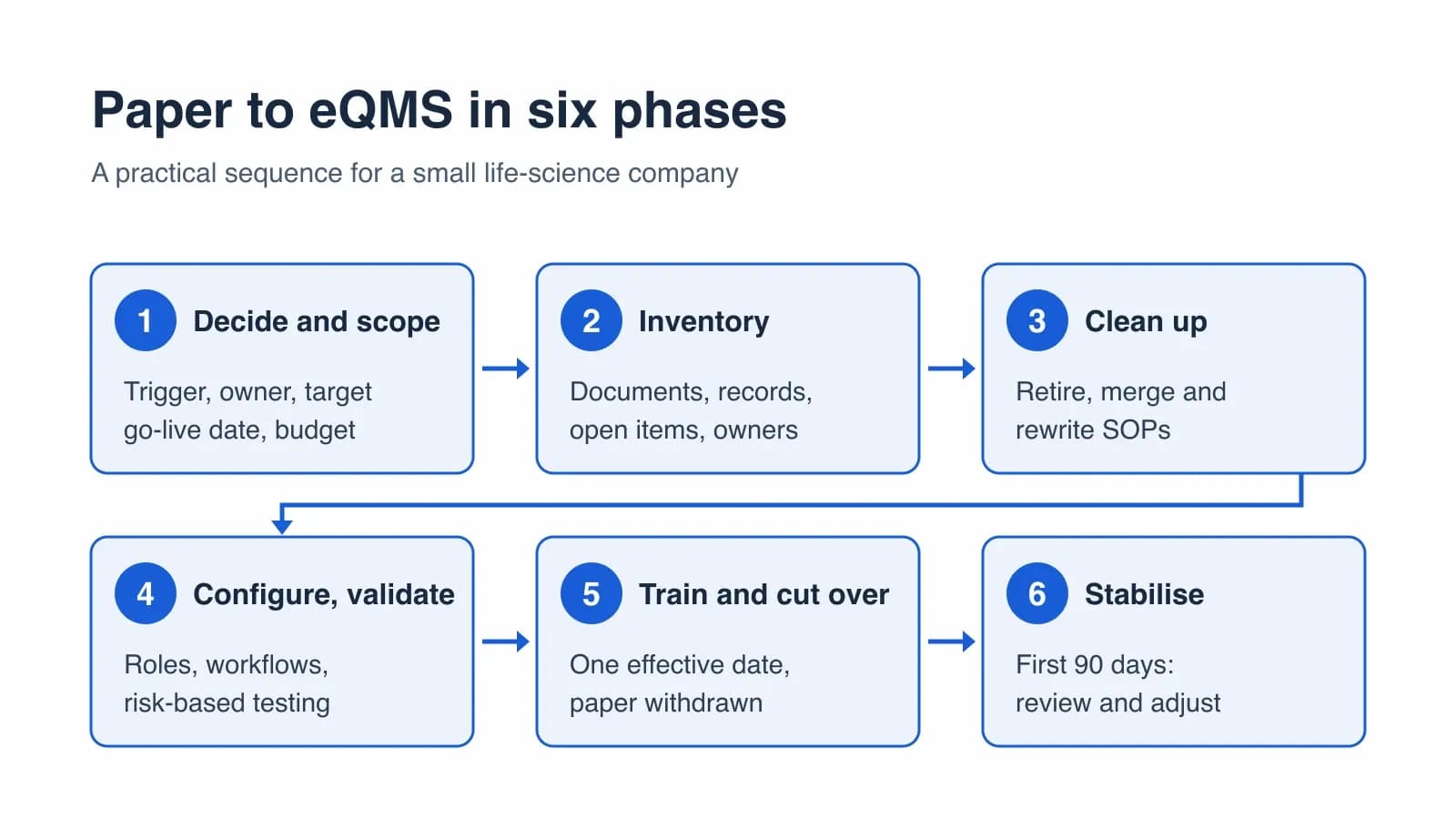
Moving a small life-science company from paper to an eQMS works best as six phases: decide and scope, take an inventory, clean up your procedures, configure and validate the system, train people and cut over on a single effective date, then stabilise over the first 90 days. Most of the effort sits before go-live, in deciding what to migrate, what to archive and how to keep legacy records retrievable. The software set-up itself is usually the smaller part of the project.
This plan is written for quality managers, QA/RA leads and founders at companies with roughly five to 150 people. It assumes your current quality system is a mix of signed paper, Word files and spreadsheets. It also assumes nobody can work on the project full-time.
When to move: the usual triggers
A paper system can be compliant. EU GMP Chapter 4 explicitly covers paper, electronic and hybrid documentation, and ISO 13485 does not require records to be electronic. The case for moving is usually practical: paper gets harder to run as the company and its obligations grow. Common triggers are:
- A first GMP or GDP licence application. Inspectors will expect controlled documents, training records and deviation handling from the first day of operations. It is usually easier to set this up once than to rebuild it a year later.
- ISO 13485 certification or a first notified-body audit. Auditors sample records across the whole quality system. A system that can show approvals, versions and training on demand shortens audit preparation.
- Investor or partner due diligence. Buyers and licensing partners often ask for evidence of a working quality system, not just a set of SOPs.
- Team growth. Once headcount passes a few dozen people, chasing signatures and keeping the training matrix current by hand can turn into a part-time job.
- Repeated findings. Findings such as missing training before an SOP became effective, superseded versions still in use, or CAPAs closed without evidence suggest the process itself needs support.
If none of these apply yet, you may not need to move now. If two or more apply, start planning. Migrating during a licence application or an audit cycle leaves no room for mistakes.
Phase 1: decide and scope
Name one project owner, usually the head of quality. Agree three things in writing with management:
- Scope for go-live. Many small companies start with document control and training, then add deviations, CAPAs and change control. Live quality events are the hardest to move halfway through, which is why they usually come second.
- A target go-live date that avoids planned inspections, audits and product launches.
- The people and budget available. Include time from subject-matter experts who will review SOPs, not just the quality team. Our eQMS cost guide lists the cost items to budget for.
Treat the migration itself as a planned change under your existing change control procedure. It touches almost every SOP, so an inspector will reasonably expect to see an impact assessment and an approval for it.
Phase 2: inventory what you have
You cannot plan a migration without a complete list. Build a single register (a spreadsheet is fine at this stage) with one row per item:
- Controlled documents: quality manual, policies, SOPs, work instructions, forms and templates, specifications. Record the document number, current version, owner, effective date and next review date.
- Records: training records, batch or device history records, deviation and complaint files, CAPAs, change controls, audit reports, supplier qualification files, validation documents.
- Open items: every deviation, CAPA, change control and complaint that is not yet closed, with its owner and due date.
- Where each item physically lives: binder, shared drive folder, personal mailbox, external archive.
The open items list matters most for cut-over planning. The records list matters most for deciding what stays on paper.
Phase 3: decide what to migrate and what to archive
You do not have to load every historical record into the new system. The usual split is:
- Migrate: current effective documents, current training status per person, and open quality records.
- Archive in place: closed historical records, kept in their original form for the retention period with a reference in the new system.
- Scan as true copies: paper records you want to retrieve electronically, or originals you want to destroy to save space.
Retention periods still apply to legacy records
Moving to an eQMS does not change how long records must be kept. EU GMP Chapter 4 (section 4.11) requires batch documentation to be kept for one year after the batch expires, or at least five years after Qualified Person certification, whichever is longer. Section 4.12 links the retention of other documents to the business activity they support. ISO 13485:2016 (clause 4.2.5) requires records to be kept for at least the lifetime of the device as defined by the organisation, and not less than two years from product release. Check national law and your customer contracts too, as either may require longer periods.
Paper originals and true copies
If you want to scan paper and then destroy the originals, the scan has to be a true copy. The MHRA GxP Data Integrity Guidance (2018) defines a true copy as one verified to contain the same information as the original, including context and structure. It allows true copies to replace originals if a documented process verifies the copy. It also asks organisations to consider the risk of destroying the originals. PIC/S PI 041-1 (2021) adds practical inspection points: the copying procedure should be controlled, and copies should be checked against the original. Disposal of originals should follow a documented process, with a register of what was archived or destroyed. FDA's 2018 data integrity Q&A likewise accepts electronic copies as true copies when they preserve the content and meaning of the original, including metadata.
In practice, small companies often keep paper originals for the most critical records, such as batch records and signed validation reports, and only scan to make them easier to find. A scanning SOP, a defined quality check (for example, 100% page-count checks plus a sampled visual comparison) and a disposal log are the minimum if you plan to destroy originals.
Avoid an open-ended hybrid state
EU GMP Chapter 4 (section 4.1) accepts hybrid documentation, but it expects the relationship between master documents, official copies and records to be clearly defined. PIC/S PI 041-1 goes further and discourages hybrid systems where they can be replaced. The practical lesson is to set an end date. After go-live, a procedure is either in the eQMS or formally retired. It should never be valid in both places.
Phase 4: clean up your SOPs before you migrate
Migrating a weak document set gives you the same weak documents in a better system. Use the inventory to sort every document into one of four groups:
- Keep as is: accurate, used, recently reviewed.
- Update: still needed, but out of date or describing paper steps that will change. Signature routing, logbooks and manual training sign-off are the usual examples.
- Merge: overlapping procedures, such as three SOPs covering parts of document control.
- Retire: procedures nobody follows or that describe processes you no longer run.
Rewrite the procedures the eQMS directly affects: document control, training, deviations, CAPA, change control, record retention and the new system's own user procedure. Our guide on how to write a GMP SOP covers structure and wording. Keep document numbers stable where you can. Auditors and staff will search for the old numbers.
Phase 5: configure workflows, roles and validation
Workflows and roles
Map your approved procedures onto the system, not the other way round. For each process, decide who drafts, reviews, approves and closes, and which steps need an electronic signature. Keep roles few and simple: a system administrator, process owners who create and review records, QA who assess and approve, and operators who read documents and complete training. Every user needs an individual account. Shared logins break attributability, which is explained in our article on ALCOA+ and data integrity.
The training matrix is the second big configuration task. Assign each document to roles rather than named people, so that new joiners and role changes pick up the right training automatically. Our GxP training matrix guide walks through this.
Validation proportionate to risk
An eQMS used for GxP records is a computerised system that needs validating for its intended use. EU GMP Annex 11 states the principle plainly: replacing a manual operation should not lower product quality, process control or quality assurance, or increase overall risk. ISO 13485:2016 (clause 4.1.6) requires the validation of software used in the quality management system to be proportionate to the risk of its use. FDA's Computer Software Assurance guidance for production and quality management system software (final, current version February 2026) describes a risk-based approach that concentrates assurance effort on features where a failure could compromise product quality or patient safety.
For a small company using a cloud eQMS, a proportionate package typically includes:
- A short validation plan stating intended use, scope and the risk-based approach.
- User requirements for the features you rely on: approvals, e-signatures, version control, audit trail, training assignment, access control.
- Supplier assessment, using the vendor's own validation documentation where it is adequate, rather than repeating their testing.
- Testing of your configuration: your workflows, your roles, your signature steps, mostly through unscripted or lightly scripted tests with recorded evidence.
- Data migration checks. Annex 11 (clause 4.8) expects migration validation to check that data are not altered in value or meaning. In practice, that means reconciling counts and spot-checking content and metadata of migrated documents against the source.
- A validation report with the release decision.
Our article on CSA vs CSV explains how to scale this effort. For the EU picture, including the 2025 draft revision of Annex 11, see EU GMP Annex 11 revision.
Phase 6: train users and plan the cut-over
Training
Train in two layers. First, train everyone on the revised procedures, because the SOPs describe what they must do. Second, train them on the tool, because it shows how. Short role-based sessions usually work better than one long demonstration. Document control and training records are among the first things auditors usually sample after go-live, so make sure the training on the new procedures is itself recorded.
One effective date
EU GMP Chapter 4 (section 4.3) expects the effective date of each instruction to be defined. Pick a single go-live date for the whole first scope and communicate it early. On that date:
- revised procedures become effective in the eQMS;
- paper master copies are withdrawn and marked as superseded;
- uncontrolled printouts are collected;
- new quality events are raised only in the eQMS.
Parallel running: usually a mistake
Running paper and electronic processes side by side "to be safe" sounds prudent. In practice it creates two sources of truth, double data entry and arguments about which record is the original. If you want a safety net, use a short pilot with one process or one team before go-live, not parallel running after it.
Open records at cut-over
Decide per record type. Open deviations and CAPAs close to completion can usually finish on paper, with a reference recorded in the eQMS. Long-running items, such as CAPAs with effectiveness checks months away, are better re-created in the system. Their paper history should be attached as a true copy or referenced. Write the rule down in the migration plan so the choice is consistent.
The first 90 days
- Weeks 1 to 2: daily check-ins with key users, a simple log of questions and issues, quick fixes to configuration where procedures allow.
- Weeks 3 to 6: check that training assignments are being completed and that approvals are not stuck with one person. Confirm no paper forms are still circulating.
- Weeks 7 to 12: run a short internal audit of the migrated processes. Review the issues log, raise CAPAs or change requests for anything systemic, and plan the next module.
By day 90 you should be able to pull, for any SOP, its approval history, current version and the training status of everyone who needs it, without opening a binder.
Common mistakes
- Migrating every historical record instead of deciding what to archive.
- Copying outdated SOPs into the new system without review.
- Designing workflows with too many approval steps, which then become bottlenecks.
- Shared or generic accounts "just for the warehouse".
- Destroying paper originals without a documented true-copy process.
- Leaving the old shared drive writeable after go-live.
- Validating everything to the same depth instead of focusing on high-risk functions.
- Skipping training on the revised procedures and training only on the software.
What auditors and inspectors look for
After a migration, expect questions on how the change was controlled and how you know nothing was lost. Have ready the change control record for the migration, the inventory, the archive and true-copy decisions, the validation report with migration checks, and training records showing people were trained before the new procedures took effect. Inspectors also check that superseded paper versions are no longer in use and that every user has an individual login.
Next step
Start this week with the inventory spreadsheet. It will show the real size of the project, and every later decision depends on it. Once you are comparing systems, QFacts is one option to consider. It covers document control, training and quality processes for small regulated teams, and you can test your own workflows during a 14-day free trial. See pricing for details.
Sources and further reading
- EudraLex Volume 4, EU GMP Guidelines, Chapter 4: Documentation (revision 1, in operation since 30 June 2011)European Commission
- EudraLex Volume 4, EU GMP Guidelines, Annex 11: Computerised Systems (2011)European Commission
- GxP Data Integrity Guidance and Definitions (Revision 1, March 2018)Medicines and Healthcare products Regulatory Agency (MHRA)
- PI 041-1: Good Practices for Data Management and Integrity in Regulated GMP/GDP Environments (1 July 2021)Pharmaceutical Inspection Co-operation Scheme (PIC/S)
- Data Integrity and Compliance With Drug CGMP: Questions and Answers (December 2018)U.S. Food and Drug Administration
- Computer Software Assurance for Production and Quality Management System Software (final guidance, February 2026)U.S. Food and Drug Administration
- ISO 13485:2016 Medical devices: Quality management systems: Requirements for regulatory purposesInternational Organization for Standardization (ISO)
Try QFacts with your own quality workflow.
Get new articles by email
Practical guidance on quality management and compliance, delivered to your inbox.