
eQMS vs SharePoint for GMP document control: where the line is
SharePoint can hold GMP documents, but approvals with signature meaning, effective dates, training before use and audit trail review are yours to build and validate. Here is what Microsoft 365 provides, what it leaves to you, and when an eQMS becomes worth it.

SharePoint can hold GMP documents, and many small life-science companies run their first SOPs on it without trouble. The line is not storage. It is the controlled process around each document: approval with signatures that carry a meaning, a defined effective date, training before use, withdrawal of superseded versions, a reviewable audit trail and links to change control and CAPA. Microsoft 365 gives you building blocks for all of these. In SharePoint, you design, configure, validate and maintain that process yourself. A dedicated eQMS usually ships it as standard functionality, which you still verify for your intended use.
This article sets out what the regulations ask for, what Microsoft 365 already does well, what you would have to build, and how to tell when the build is no longer worth it.
What GMP expects from document control
Start with the requirements, not the tool. Three texts set most expectations for electronic document control in pharma and biotech.
EU GMP Chapter 4 (Documentation, 2011). Clause 4.1 asks for appropriate controls for electronic documents and says the relationship between master documents, official copies and records must be stated, including for hybrid paper-and-electronic systems. Clause 4.3 says instructions must be approved, signed and dated by authorised people, uniquely identifiable, and have a defined effective date. Clause 4.5 requires documents in the quality system to be reviewed regularly and kept up to date.
EU GMP Annex 11 (Computerised Systems, 2011). Annex 11 asks you to base the extent of validation on a documented risk assessment (section 1). Based on risk, it expects a system-generated audit trail of GMP-relevant changes and deletions, with the reason recorded and the trail reviewed regularly (section 9). Systems should record who entered, changed or deleted data, and when (12.4). Electronic signatures should carry the same weight as handwritten ones, be permanently linked to the record and include the date and time (section 14). Revised drafts of Chapter 4 and Annex 11 went out for consultation in July 2025, but the European Commission's EudraLex page still lists the 2011 versions at the time of writing. We cover the draft in our Annex 11 revision article.
21 CFR Part 11 (FDA). Section 11.10 requires validation, limited system access and secure, computer-generated, time-stamped audit trails that do not obscure earlier entries and are kept as long as the records. Section 11.50 says a signed record must show the signer's printed name, the date and time, and the meaning of the signature, such as review or approval. Section 11.70 requires signatures to be linked to their records so they cannot be copied or removed. Section 11.200 requires at least two identification components, such as a user ID and password. FDA's 2003 Scope and Application guidance applies enforcement discretion to some Part 11 controls, including validation and audit trails. Predicate-rule requirements still apply, and FDA still enforces the electronic signature requirements.
Medical device companies working under ISO 13485 have a further explicit requirement: clause 4.2.4 requires them to prevent the unintended use of obsolete documents.
What SharePoint and Microsoft 365 already do well
A fair comparison starts with what you get without writing a single flow.
- Version history. Libraries can keep major and, if enabled, minor versions, showing who saved each version and when. Admins can set limits on version history for the organisation, a site or a library, either automatic or manual by count and age. Microsoft's documentation warns that versions trimmed by these limits are deleted permanently. They are not sent to the recycle bin. Items under a retention policy or hold are exempt.
- Permissions and identity. Access is controlled through Microsoft Entra ID groups and SharePoint permissions. Multi-factor authentication is available.
- Approvals. You can require content approval on a library, and a newer approvals feature adds an approval status column and routes requests to the Teams Approvals app. For more complex routing, Power Automate approvals supports parallel and sequential approvers and keeps approval data in a Dataverse database.
- Retention and records. Microsoft Purview records management can declare a document a record. Editing and deletion are then blocked while the record is locked. A label for a regulatory record cannot be removed by anyone, including a global administrator.
- Audit log. The Purview audit log captures user activity. Audit (Standard) keeps records for 180 days. With Audit (Premium), SharePoint records are kept for one year by default and up to ten years with an add-on licence.
- eSignature. SharePoint's pay-as-you-go eSignature service can send PDF and Word documents for signature. It also connects to Adobe Acrobat Sign and Docusign. Microsoft says the service uses simple electronic signatures as defined under the EU eIDAS Regulation.
Microsoft's own Part 11 page sums up the division of responsibility. It states that no certification exists for Part 11 compliance. Microsoft's audited controls (SOC 1 and 2, ISO/IEC 27001 and 27018) can support your qualification work. However, customers who deploy applications subject to FDA regulation are responsible for making sure those applications meet FDA requirements. That is the honest starting point: Microsoft 365 is a capable, well-audited platform, and a GMP document control process built on it is your system to specify and validate.
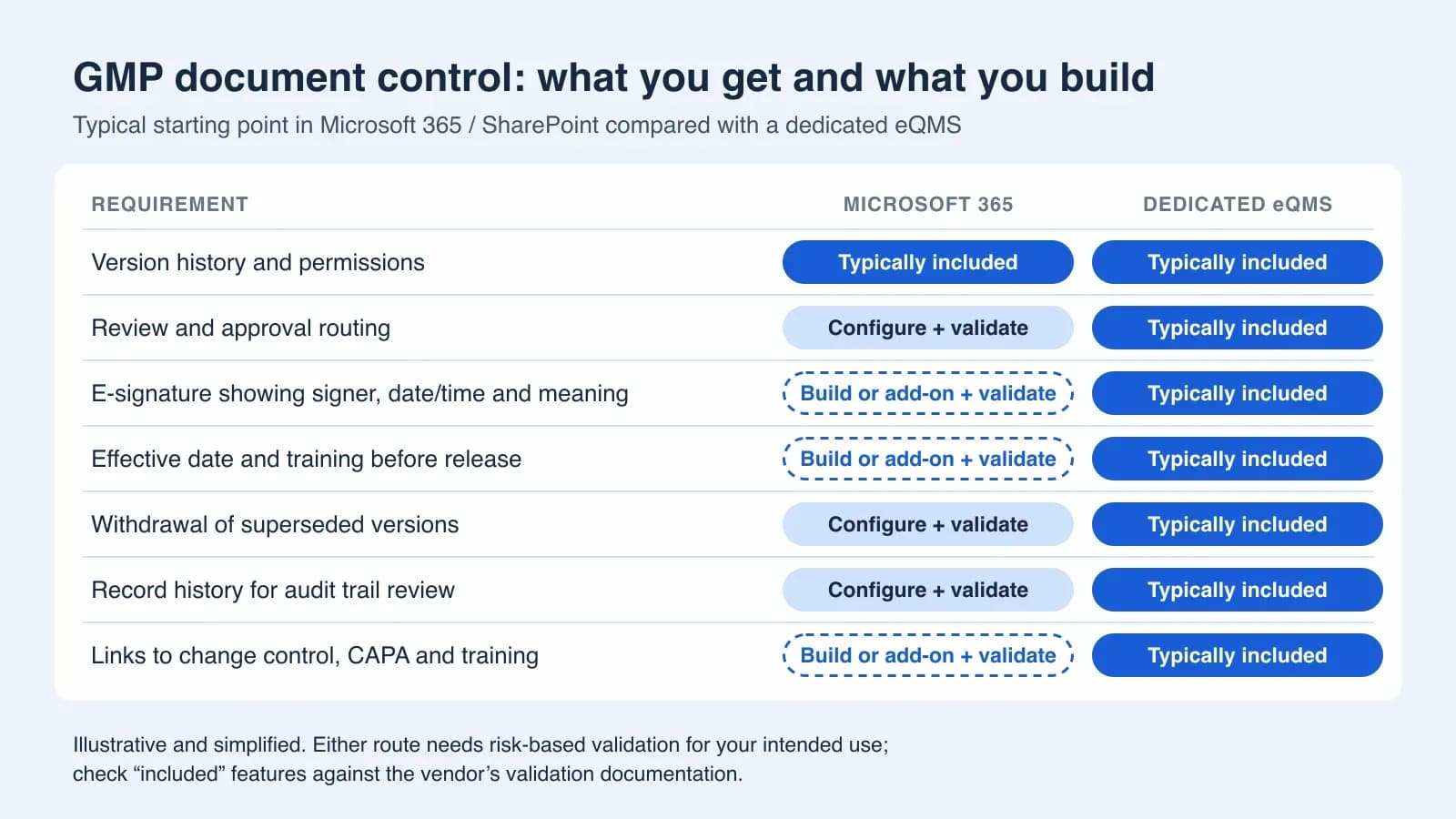
Where the line is: what you build, validate and maintain
Approval signatures that carry a meaning
Approving a request in Outlook or Teams records a response from a signed-in user. A GMP approval needs more than that. Under Part 11 and Annex 11, the signed document must show who signed, when, and with what meaning (author, reviewer, QA approver). That information must stay linked to the exact version that was signed and appear on screen and in printouts. You also have to decide how users re-authenticate when they sign, and test that the evidence survives later edits, renames and moves. These controls can be built with flows, content types and a signature page, or added with a third-party add-on. In either case, the design and the validation are your responsibility.
Effective dates and training before use
SharePoint has no built-in difference between "approved" and "effective". Chapter 4 asks for a defined effective date, and many quality systems also require affected staff to be trained before a new version comes into force. On SharePoint, that typically means date columns, a flow that holds back publication, a training list or a separate learning system, and reminders. Each part needs to be specified and tested. If training is your weak point, our guide to building a GxP training matrix shows what inspectors usually ask to see.
Superseded and obsolete copies
Version history keeps old versions, which is good for traceability. You still have to decide who can open them and how readers can tell which version is current. You also need a rule for downloaded, synced or printed copies, because those leave SharePoint's control as soon as they reach a laptop or a printer. A paper-era rule such as "only printouts stamped CONTROLLED are valid" usually becomes a written procedure, not a system control.
Audit trail completeness and review
Version history tells you who changed a file and when, but not why. Annex 11 expects the reason for GMP-relevant changes to be documented. The Purview audit log adds detail, but it is a tenant-wide security log, and its retention depends on your licence (180 days in Standard). EU GMP Chapter 4 requires batch documentation to be kept for at least one year after the batch expires or five years after certification, whichever is longer. Part 11 requires audit trails to be kept as long as the records they cover. You therefore need a documented plan for retaining, exporting and regularly reviewing that history. Version limits must also not delete what you need: apply a retention policy or label to GMP libraries.
Periodic review
A review-date column and a scheduled flow can send reminders. You must then show an inspector that every effective document was reviewed on time, and that reviews which found nothing to change were also recorded.
Links to change control, CAPA and training
Inspectors rarely look at one SOP in isolation. They follow a thread: the deviation, the CAPA, the change control that revised the SOP, the training on the new version. In SharePoint, each of these is a list or library joined by lookups and flows. Keeping those links reliable is where many in-house builds struggle. Our article on change control traceability explains what that thread should contain.
Validation and platform change
Microsoft updates Microsoft 365 continuously. Features appear, change and are retired on Microsoft's schedule. The new library approvals feature, for example, went through several revised rollout dates in Microsoft's message centre. Annex 11 expects controlled changes (section 10) and periodic evaluation of the validated state (section 11). Someone in your organisation has to watch Microsoft's change announcements, assess their impact on your configuration and re-test where needed. A risk-based approach keeps this proportionate; see our explainer on computer software assurance versus classic CSV.
The costs that do not appear on the licence
SharePoint often feels free because the licences are already paid for. The real costs are elsewhere:
- Design and build time for flows, content types, signature pages and lists, whether done in-house or by a consultant.
- Validation documentation: user requirements, configuration specification, risk assessment, test scripts and a report, kept current after every change.
- Add-on licences where needed, such as Audit (Premium) or long-term audit retention, per-transaction eSignature, or third-party signature and training tools.
- Ongoing monitoring of Microsoft changes and the regression testing that follows.
- Key-person risk: the flows often depend on one person, and the system becomes hard to maintain when they leave.
None of this makes SharePoint the wrong choice. It means a fair comparison counts internal hours as well as invoices. Our eQMS pricing guide breaks down the cost categories for both routes.

When SharePoint is perfectly fine
There are good reasons to stay on SharePoint for now:
- You are at an early, pre-GMP stage with a handful of SOPs and no batch release, clinical supply or inspection on the horizon.
- The documents are not GxP: HR, finance, marketing and general company policies rarely need Part 11 controls.
- You run a deliberate hybrid system: SharePoint holds the controlled PDFs, signatures are wet ink or come from a separately validated tool, and an SOP describes the controls. Chapter 4 explicitly allows hybrid systems if the relationships and controls are stated.
- You have real Microsoft 365 expertise in-house and the capacity to document and validate what you build.
Even after you move to an eQMS, SharePoint usually stays for collaboration, drafts and non-GxP content. The question is where the controlled, signed, effective version lives.
Signals that you have outgrown it
- A spreadsheet is the only reliable way to know which SOP version is effective.
- Approvals happen by email ("OK from me"), and someone prints, signs and scans the PDF.
- Training on new versions is reconciled by hand before audits.
- The flows that hold the system together are understood by one person.
- You cannot show, within minutes, the full history of one SOP: who changed it and why, who approved it, the linked change control and who was trained.
- Your audit log retention is shorter than your record retention, and nobody has a documented answer.
- You are preparing for GMP manufacturing, clinical supply or a first regulatory inspection. For Belgian sites, see what to expect from an FAMHP GMP inspection.
A practical way to decide
- List the documents that are GMP-relevant and the regulations that apply to them.
- Write short user requirements for document control, covering the topics above. Annex 11 clause 4.4 expects user requirements anyway.
- For each requirement, mark whether it is included, needs configuration, or needs a build or add-on in each option.
- Estimate the build, validation and maintenance effort over three years, not just the first.
- Ask eQMS vendors what validation documentation they provide and which testing remains with you.
- Pilot the full lifecycle of one real SOP in each option: draft, review, approval, effective date, training, periodic review and withdrawal.
If you decide to move, our guide to moving from paper and file shares to an eQMS covers sequencing and data clean-up.
If you are comparing dedicated tools, the QFacts document management module shows one example. It covers multi-level review and approval with electronic signatures, version history with an audit trail, periodic review reminders and read acknowledgements, and it assigns training automatically when a document is published.
Sources and further reading
- EudraLex Volume 4, Chapter 4: Documentation (January 2011)European Commission
- EudraLex Volume 4, Annex 11: Computerised Systems (January 2011)European Commission
- 21 CFR Part 11: Electronic Records; Electronic SignaturesU.S. Government Publishing Office (eCFR)
- Part 11, Electronic Records; Electronic Signatures: Scope and Application (Guidance for Industry, 2003)U.S. Food and Drug Administration
- Food and Drug Administration CFR Title 21 Part 11 (compliance offering)Microsoft Learn
- Learn about auditing solutions in Microsoft PurviewMicrosoft Learn
- Version history limits for document library and OneDrive overviewMicrosoft Learn
- Overview of eSignatureMicrosoft Learn
Try QFacts with your own quality workflow.
Get new articles by email
Practical guidance on quality management and compliance, delivered to your inbox.