
Document management built for regulated industries
Control the entire lifecycle of your quality documents: from drafting and review to approval and archival. QFacts ensures every SOP, work instruction, and batch record meets GxP standards.

See it in the product
Recorded in QFacts, on the same screens your team will use.
1. Approve
Approve a revision and assign its training in one step
QA reads the document next to its workflow. In the approval they set the effective date and can require training, with a due date and an optional quiz. A signature with their password confirms the decision.
- Comment, effective date and training set in the same approval
- Training goes to whole curricula, such as all filling line 3 operators
- Signed electronically and kept in the document timeline
2. Connect
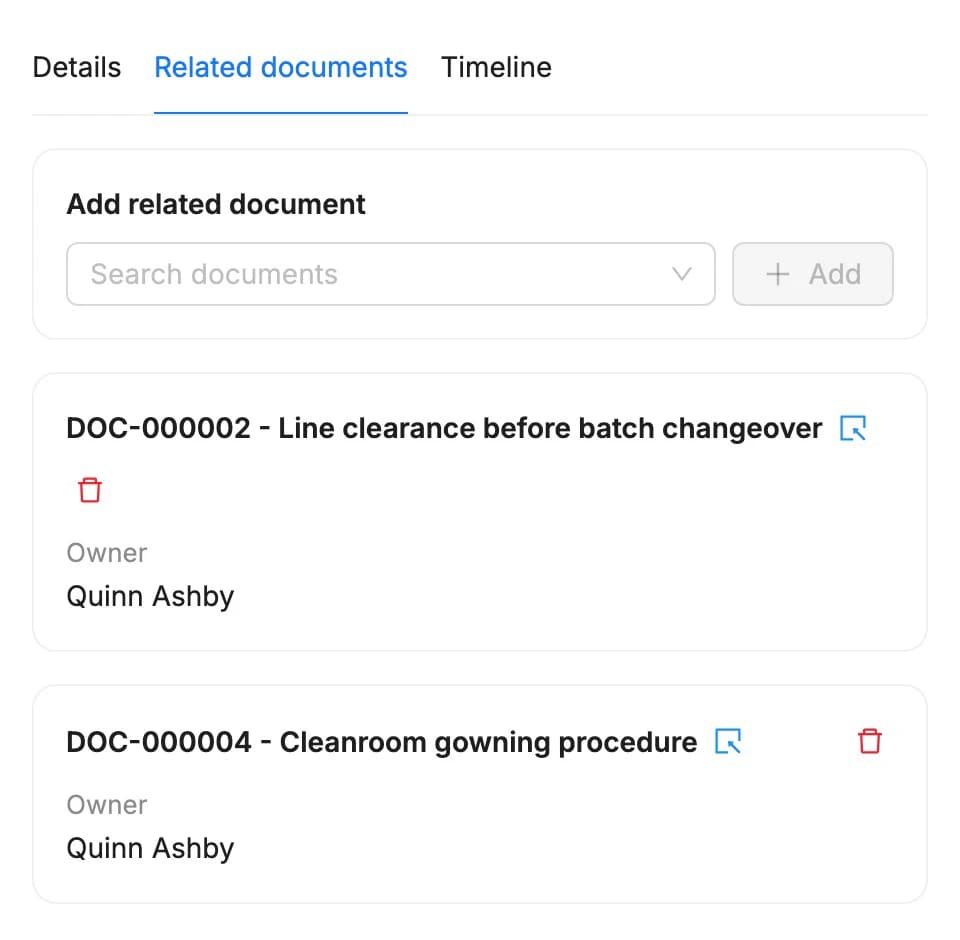
Link the documents that belong together
Each document has a Related documents tab. Search by number or title and add the link, so a reader finds the procedures that go with it.
- Search all documents by number or title
- Open a linked document with one click
- Only QA can add or remove links
3. Reference
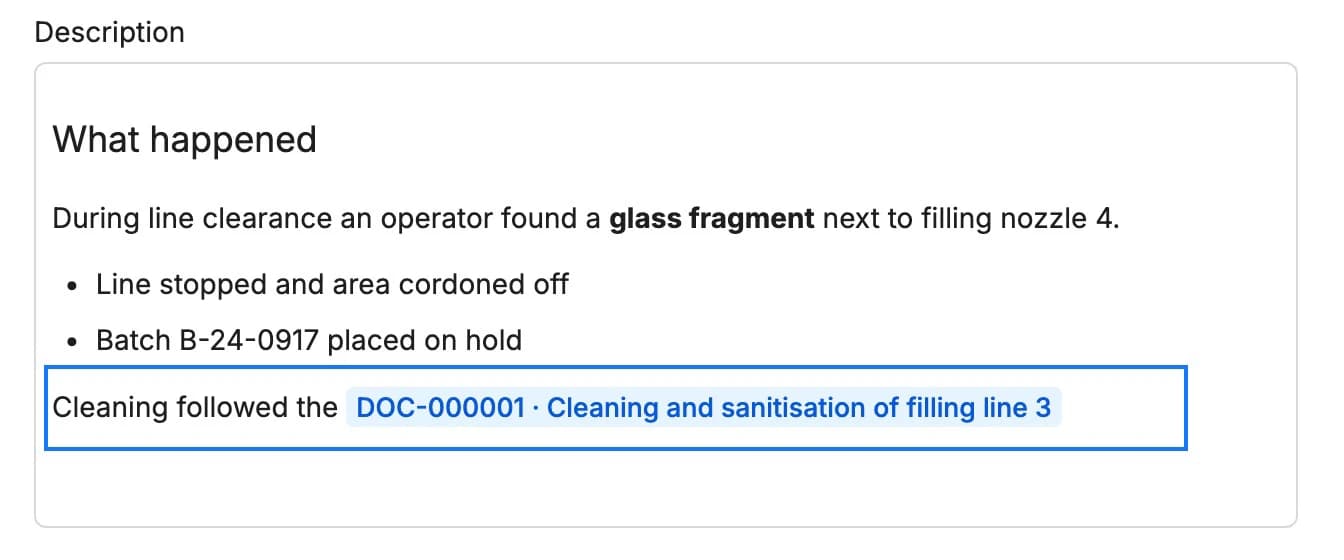
Point to the procedure from any record
Descriptions of events, CAPAs, change controls, investigations and actions are rich text. Use headings, bold text and lists, and reference a document inline so readers go straight to it.
- Headings, bold text and lists in record descriptions
- Inline references to documents and other records
- Available in events, CAPAs, change control, investigations and actions
Why teams choose QFacts for document control
Purpose-built for pharmaceutical, medical device, and food safety companies that need reliable, audit-ready document management.
Version Control
Every document revision is tracked automatically. Compare versions side by side and maintain a complete history that satisfies auditor requirements.
Approval Workflows
Configure multi-level review and approval chains that match your quality procedures. Electronic signatures with 21 CFR Part 11 compliance.
Audit Trail
Full traceability of every action: who created, reviewed, approved, or modified a document and when. Always inspection-ready.
Template Library
Pre-built templates for SOPs, work instructions, forms, and batch records. Ensure consistency and reduce document creation time by up to 60%.
Periodic Review
Automated reminders for document review cycles. Never miss a review deadline and keep your quality system current with regulatory expectations.
Controlled Distribution
Ensure the right people see the right version. Acknowledgement receipts confirm employees have read and understood updated procedures.
From draft to archive in five steps
A clear workflow that mirrors how your quality team already works, just faster, with full traceability.
Create
Draft documents from templates or upload existing files into the controlled system.
Review
Route to subject matter experts for content review with tracked comments and redlines.
Approve
Multi-level electronic approval with configurable sign-off chains and e-signatures.
Publish
Release approved documents with automatic notifications to affected personnel.
Archive
Superseded versions are archived automatically while remaining accessible for reference.
Built for your role
See how different team members use QFacts Document Management every day.
See how Quality Manager uses Document Control to create and publish SOPs with multi-level approval workflows, ensuring every procedure meets regulatory standards before reaching the production floor.
See how Auditor uses Document Control to pull any document with its complete revision history and approval chain in seconds during an inspection, eliminating frantic paper searches.
- TrainingAssign training, track competency, and ensure compliance.
- Events & ComplaintsCapture events, complaints, and deviations in one place.
- CAPAsManage corrective and preventive actions to drive improvement.
- Change ControlPlan, assess, and approve changes with full traceability.
- ChecklistsRun approved checklists with expected results, review and e-signatures.
- Regulatory ComplianceStay compliant with FDA, EMA, and ISO regulations.
Put QFacts to work for 14 days.
Sign up directly and explore how QFacts connects your documents, training and quality workflows. Start with a process your team knows.