How much does an eQMS cost? A 2026 pricing guide for small life-science companies
What small pharma, biotech and medical device teams actually pay for an eQMS: how vendors price, the prices that are public in October 2026, an illustrative ten-person example, and the implementation, validation and internal costs to budget for.

For a small life-science company, the subscription for an eQMS can cost anything from nothing to tens of thousands of euros a year. On their own pricing pages in October 2026, Formwork listed plans from free to €499 a month, Cognidox started at £6,000 a year, SimplerQMS started at USD 17,500 a year for up to 15 users, and QFacts charged €57.50 per full user per month. Many established vendors publish no prices and quote each customer separately. The subscription is also only part of the bill. Implementation, validation, migration, training and your own team's time can matter as much as the licence. A fair comparison looks at the total cost over three years.
This guide explains how vendors structure their prices, lists the prices that are public, works through an illustrative example for a ten-person team and gives you questions to put to every vendor.
How eQMS vendors structure their prices
Most pricing models combine a few building blocks. Knowing them makes quotes easier to compare.
Per user, often by user type
The most common model charges for each named user. Many vendors separate people who create, review and approve records from people who mainly read procedures and complete training. Those reader seats are much cheaper and sometimes free. The names differ (full, standard, light, lite, viewer), so check exactly what each type can do. In particular, check whether a cheaper seat can sign a training record or report a deviation.
Per module or by bundle
Some vendors sell document control, training, CAPA, change control, complaints, audits and supplier management as separate modules or in tiered bundles. Others include every module in one price. Bundles can look cheap at the entry level and grow quickly when you add the processes an inspector expects to see connected.
Flat platform fee
A few vendors charge a fixed monthly or annual fee with a user limit, or with unlimited users. This is predictable for growing teams. Check what the fee covers and what happens when you exceed a limit.
Implementation, onboarding and validation fees
Vendors differ most here. Some include onboarding, validation documentation and migration in the subscription. Others charge a one-off implementation fee or sell validation packs and professional services separately. Ask for these lines in writing.
Billing period and contract terms
Annual billing usually costs less per user than monthly billing. Some vendors require an annual or multi-year commitment, while others bill monthly and let you cancel. Check the minimum term, notice period, how seats can be reduced and how renewal prices are set.
Publicly listed prices (October 2026)
We checked each vendor's own pricing page on 8 October 2026. Prices change, products differ in scope, and some figures exclude VAT, so treat this list as a starting point rather than a like-for-like comparison. Vendors are listed alphabetically.
- Cognidox: an annual subscription "starting from £6,000 per year", as listed on cognidox.com/pricing in October 2026. Tiers are defined by user limit: Starter (5), Growth (30), Scale (50), Pro (100) and Enterprise (custom). The page lists a validation pack, described as mainly for medical device customers, as an add-on, and professional services such as training and workflow configuration separately, without prices.
- Formwork by OpenRegulatory: a free Community Edition (5 user seats, 10 documents and 10 records), Formwork Starter at €99 per month plus VAT (5 user seats) and Formwork QMS + Techdoc at €499 per month plus VAT with unlimited user seats, as listed on openregulatory.com/pricing in October 2026. Annual billing is offered with one month free. The product is aimed at medical device companies.
- QFacts: Full Access at €57.50 per user per month and Lite Access at €17.25 per user per month on monthly billing, as listed on qfacts.be/pricing in October 2026. With annual billing, teams of 1 to 49 combined seats pay the equivalent of €50 and €15 per user per month. Lower annual rates apply from 50, 150 and 300 seats. The page lists all six quality modules, a 7-day free trial without a credit card, no long-term contract and "zero implementation cost".
- SimplerQMS: a Starter plan for up to 15 users "starting from USD 17,500 annually", with Team and Enterprise plans for more than 15 users on request, as listed on simplerqms.com/pricing in October 2026. Read-only Viewer licences are free. The page states that implementation, validation, data migration and user training are included in the subscription.
Several well-known vendors do not publish prices. Greenlight Guru, MasterControl, Qualio and Scilife ask buyers to request a quote on their pricing pages, and we could not find published prices for Veeva's quality applications. Qualio's page notes that an implementation fee applies to all plans. Scilife's page shows three plan tiers (Essential, Core and Core+) with a "Get pricing" button for each. Third-party sites publish estimates for these vendors, but the figures vary and are not confirmed by the vendors, so ask for a written quote based on your own user mix.
Worked example: a ten-person team (illustrative)
Take an illustrative company with ten people who need access. Four of them write, review and approve records: the QA lead, a QA officer, the production lead and a regulatory affairs manager. Six operators read SOPs and complete their training. Using the QFacts prices listed above:
- Monthly billing: 4 × €57.50 = €230, plus 6 × €17.25 = €103.50, gives €333.50 per month, or €4,002 over twelve months.
- Annual billing: ten seats fall in the 1 to 49 tier, so 4 × €600 = €2,400, plus 6 × €180 = €1,080, gives €3,480 per year.
The same exercise works for any vendor. Ask for the exact user types you need, multiply by the listed or quoted rate, and add every fee that is not included. A per-user model and an all-inclusive plan with a minimum fee can produce very different totals for the same ten people. A larger team or a different mix of users can reverse the order.
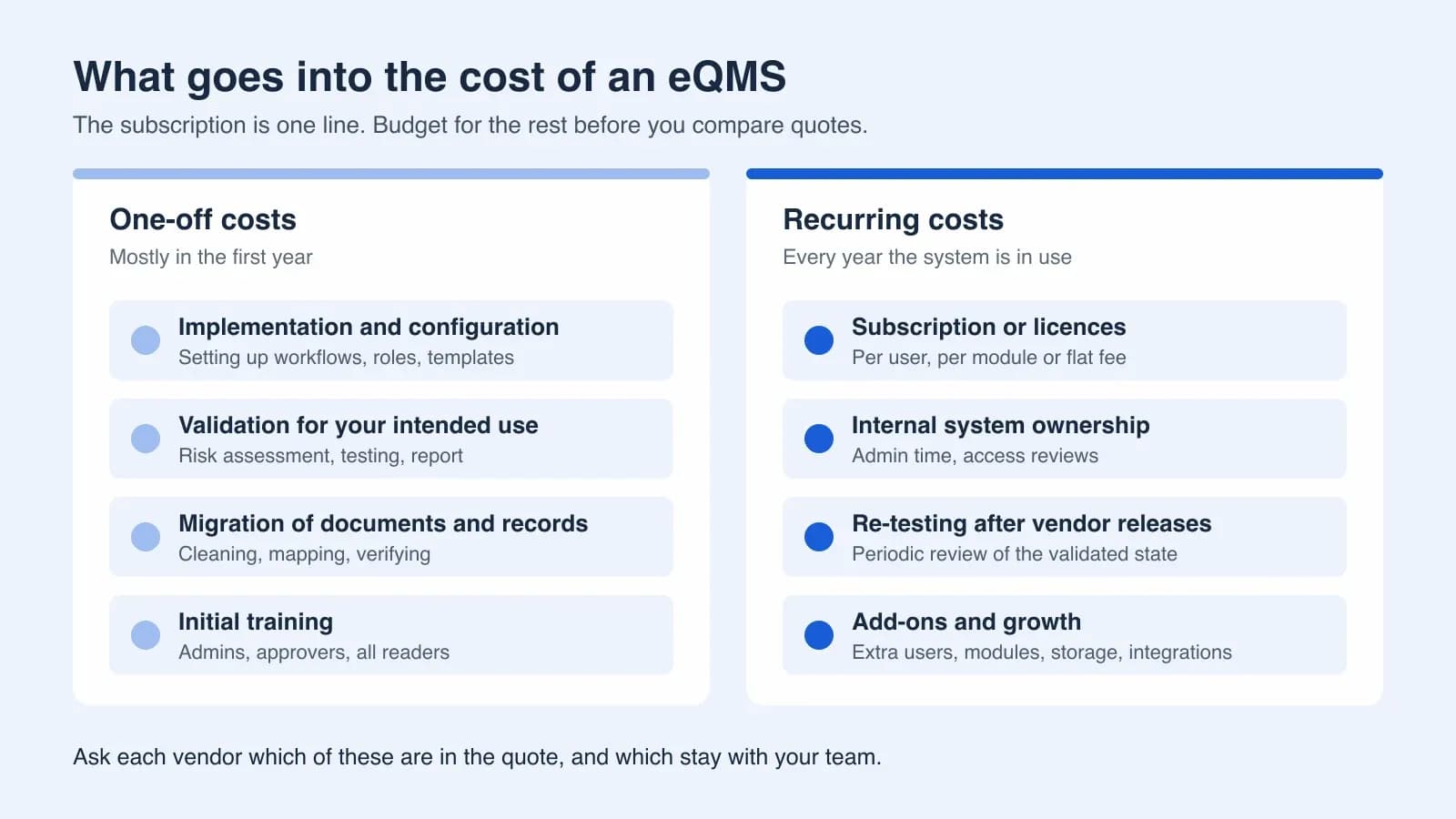
The subscription is still only one line. For the same team, also budget:
- Internal time to configure workflows, roles and templates, even when the vendor does not charge for onboarding.
- Validation for your intended use: a risk assessment, verification of critical functions and a short report, supported by the vendor's documentation.
- Migration of current SOPs, forms and open records, including clean-up of documents that should have been retired.
- Training for administrators, approvers and readers, and the records that show it happened.
- A system owner's time each month for user management, access reviews and questions.
Total cost of ownership: what to budget beyond the subscription
Implementation and configuration
Mapping your processes to the system's workflows takes time from the people who know them best. Lean systems with fixed, sensible defaults need less configuration. Highly configurable systems may need a consultant. Either way, budget time for quality staff, not only money for the vendor.
Validation
EU GMP Annex 11 requires computerised systems used in GMP activities to be validated, with the extent based on a documented risk assessment. 21 CFR Part 11 asks for the same for systems that hold FDA-regulated electronic records. A vendor's validation package reduces your work but does not replace your own verification for your intended use. A risk-based approach, as described in FDA's computer software assurance guidance, focuses effort on functions that matter for product quality and data integrity. Our article on CSA versus CSV explains how to scale this effort.
Migration
Moving documents is rarely the expensive part. The cost comes from deciding which versions are current, fixing metadata, and importing training history and open CAPAs in a way an inspector can follow. Our paper-to-eQMS migration guide covers the sequence.
Training and adoption
Everyone who uses the system needs training, and that training needs a record. Plan for the first wave and for every new joiner afterwards.
Ongoing ownership
Cloud eQMS vendors release updates regularly. Annex 11 expects you to keep the system in a validated state and evaluate it periodically. In practice, that means reading release notes, assessing their impact and re-testing where needed. Add the system owner's routine work: user changes, access reviews and periodic review of the configuration.
Exit
Find out before you sign how you would get your data out, in what format and at what cost. Retention obligations do not end when a contract does.
The cost of the alternative
Teams that compare an eQMS with "free" SharePoint often leave out the internal build and validation effort on the SharePoint side. Our comparison of eQMS and SharePoint for GMP document control lists what you would have to build yourself.
What drives the price up or down
- Number of users and mix of user types. A team with many readers benefits from cheap or free reader seats.
- Modules. Document control and training are the usual starting point. CAPA, change control, deviations and complaints follow quickly in GMP.
- Regulatory scope. Medical device design controls, risk files and technical documentation add capability, and sometimes cost.
- Validation support. A complete validation package, or validation performed by the vendor, may be included or charged separately.
- Environments. Some vendors offer separate test or validation environments. Scilife's plan comparison, for example, lists test, validation and production environments.
- Contract length. Longer commitments can lower the rate but reduce flexibility.
- Integrations, single sign-on and storage limits. Check whether these are included.
Questions to ask every vendor
- What is the total first-year and three-year cost for our exact user mix, with every fee itemised?
- Which user types exist, and what can each one do? Can the cheapest seat sign training records?
- Are implementation, onboarding, validation and migration included or charged separately?
- What validation documentation do you provide, and what testing remains with us?
- What is the minimum term and notice period, and how are renewal prices set?
- Can we add and remove users during the term, and how is that billed?
- Are there storage, record or document limits?
- How often do you release updates, and how are we told about changes that affect validated functions?
- How do we export all our data if we leave, and at what cost?
- Can we trial the system with one of our real processes before we commit?
Common pitfalls
- Comparing list prices per user without modelling your own mix of full and reader seats.
- Treating the vendor's validation package as if it completes your validation.
- Signing a multi-year agreement before running a real process, such as one SOP revision with training, through a trial.
- Buying every module on day one, or buying too few and paying more for add-ons later.
- Leaving internal time out of the business case, then running out of capacity during go-live.
Next step
Build a simple three-year cost model for your shortlist. Use the same user mix for every vendor, add one-off and recurring internal costs, and test each system with a real process before you sign. To model QFacts for your team, the pricing calculator shows monthly and annual totals for any combination of Full and Lite Access users. The document management and training pages describe the modules most teams start with.
Sources and further reading
- Cognidox PricingCognidox
- OpenRegulatory Formwork PricingOpenReg GmbH
- QFacts PricingQFacts
- QMS Software PricingSimplerQMS
- Qualio Plans and PricingQualio
- Scilife Pricing & PlansScilife
- EudraLex Volume 4, Annex 11: Computerised Systems (January 2011)European Commission
- Computer Software Assurance for Production and Quality Management System SoftwareU.S. Food and Drug Administration
Try QFacts with your own quality workflow.
Get new articles by email
Practical guidance on quality management and compliance, delivered to your inbox.